



16 Dec Streamline Your Inventory: Best Practices for QuickBooks Cleanup
Accurate inventory drives reliable financials, tax compliance, and better operations. Year End is a good opportunity to step back and take an overall look at your inventory records. In this article, “QBO” stands for QuickBooks Online (Plus, Advanced, or Intuit Enterprise Suite), “QBDT” is for QuickBooks Desktop editions (Pro, Premier, or Enterprise). Here’s a proven cleanup workflow.
Read below to learn these best practices or reach out to the Siegel Solutions team for support with assessing your files and building a repeatable inventory process.
1) Review Key Inventory Reports
Run these reports to surface discrepancies:
- Inventory Valuation Summary (QBO or QBDT) – totals should agree to Inventory Asset Value on the balance sheet for the same date.
- Inventory Stock Status by Item (QBDT)
- Physical Inventory Worksheet (QBO or QBDT) – used to prep for physical counts. The entries from the physical count form the basis for inventory adjustments.
- Item List with Quantity on Hand, Average Cost, and Asset Account (QBO or QBDT) – verify that G/L accounts are used consistently.
Look for negative quantities, zero/abnormal costs, inactive-but-selling items, duplicate entries, and mismatched item types.
2) Verify Item Setup
Open the item record and confirm:
- The appropriate item type (Inventory vs. Non-Inventory Part vs. Service) – only track quantity on hand when needed. Consider treating common commodity-type items as “non-inventory parts” and that any labor-related items are Service-type items.
- Cost, Sales price, and Income/COGS/Asset accounts
- Unit of Measure (if enabled) and Category
- SKU and naming conventions (avoid duplicates)
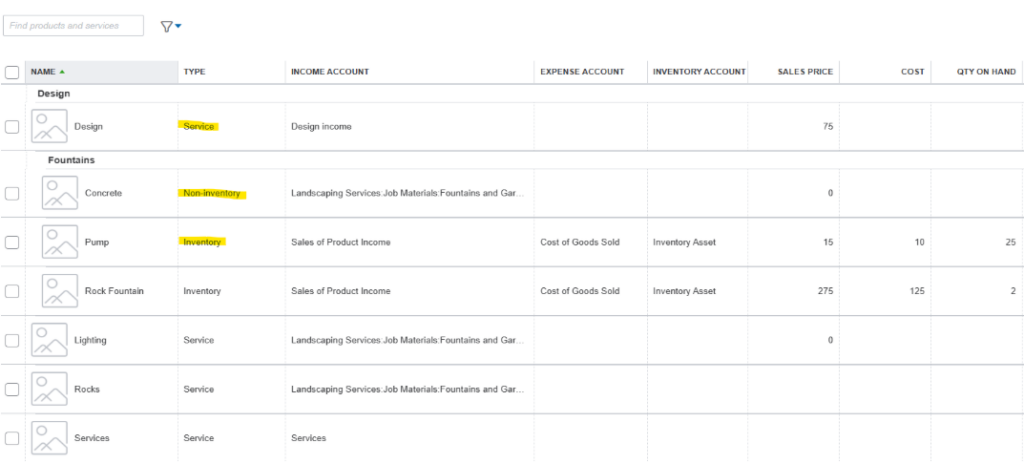
There is different accounting for the different item types, especially Inventory items. If you are using time sheets to track Job Labor, only service items can be entered on a time sheet.
3) Correct Quantities and Values
Use the proper transactions:
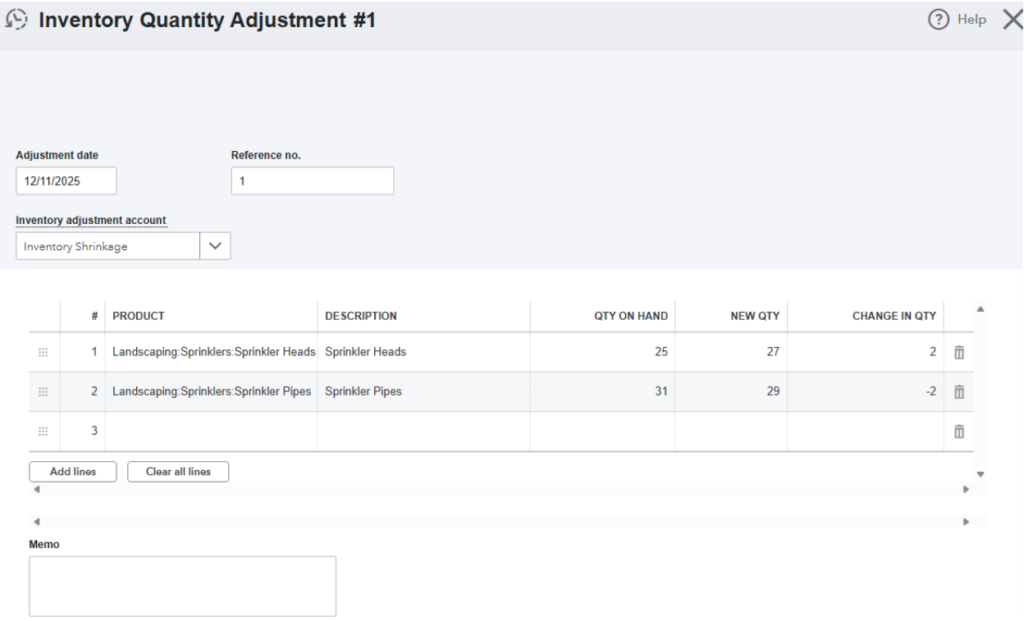
- Inventory Quantity Adjustment for count differences (QBO and QBDT)
- Inventory Value Adjustment for valuation corrections (rare; understand accounting impact) -QBDT only
- Vendor Bills/Credit Memos to fix receiving errors (QBO and QBDT)
Document reasons in the memo field and attach evidence (count sheets). Never use a Journal Entry to adjust the inventory asset balance sheet accounts. This breaks the integrity of the inventory valuation report as the sub ledger for inventory assets.
Never allow negative quantities. Negative quantities happen when an Invoice is processed (reducing inventory) before a purchase (check, expense, or bill) or Build Assembly transaction has been entered (increasing inventory). Not only is it a physical impossibility, but the presence of a negative quantity also causes inaccurate cost of sales calculations. Negative quantities can also cause data corruption in QBDT files.
QBO TIP: Due the complexities of FIFO purchase layers and limitations of QBO, make a Value Adjustment by first using a quantity adjustment to zero out the quantity on hand and then a zero dollar bill to reinstate the value at the correct cost.
4) Merge or Inactivate Duplicates
Standardize names/SKUs, then:
- Merge duplicate names to preserve history
- Inactivate obsolete items rather than deleting (QBDT only, you cannot delete Items in QBO)
- Repoint assemblies/bundles to active items (QBDT only, QBO does not have Assemblies)
Duplicate names cause confusion when entering bills or invoices and can lead to unnecessary inventory adjustments on physical counts.
5) Reconcile with Physical Inventory
Perform cycle counts and reconcile differences promptly. Investigate shrinkage or receiving issues. Schedule quarterly or monthly reviews based on volume and risk. A “cycle count” is a system where a subset of items is counted on a rotating basis. Since a full inventory count of all items is often a rigorous process, more frequent cycle counts is a good way to get everything eventually counted on a regular basis. High volume or high dollar items can be counted more often.

6) Prevent Future Issues
Implement controls:
- Train staff on correct item setup and transaction entry
- Enforce PO-to-Receiving-to-Bill workflows
- Use reorder points and low-stock alerts
- Lock prior periods and require approvals for adjustments
Quick Checklist
- Run reports and flag negatives/zeros
- Fix item setup and accounts
- Post quantity adjustments with memos
- Merge/inactivate duplicates
- Reconcile with physical counts
- Implement controls and schedule reviews
Do you need help implementing this cleanup? Contact us to assess your file and build a repeatable inventory process.