



24 Apr Projects in QuickBooks Online
Many businesses track income and expenses—but far fewer truly understand profitability at the job or project level. That’s where the Projects module in QuickBooks Online (QBO Plus and QBO Advanced) becomes a powerful tool.
Whether you manage client jobs, construction projects, consulting engagements, or custom work, Projects allows you to track every dollar earned and spent—by job—without adding complexity to your workflow.
If you want clearer visibility into project level profitability, connect with Siegel Solutions through our website to talk about QuickBooks Online.
WHAT IS THE PROJECTS MODULE?
The Projects module lets you group income, expenses, time, and labor costs under a single project or job. Instead of relying on spreadsheets or estimates, you can see real-time profitability based on actual transactions already flowing through QuickBooks.
Projects is available in QuickBooks Online Plus and QuickBooks Online Advanced.
THE PROJECT CENTER: YOUR COMMAND HUB
The Project Center acts as a central dashboard for all jobs and projects. From here, you can view all projects in one list, see project status and profitability, create new projects, and drill into project details with one click.

AUTOMATIC COST TRACKING
Projects uses transactions you already enter, including invoices, bills, expenses, checks, and time activity. When transactions are assigned to a project, QuickBooks automatically categorizes them into income, expenses, and labor.
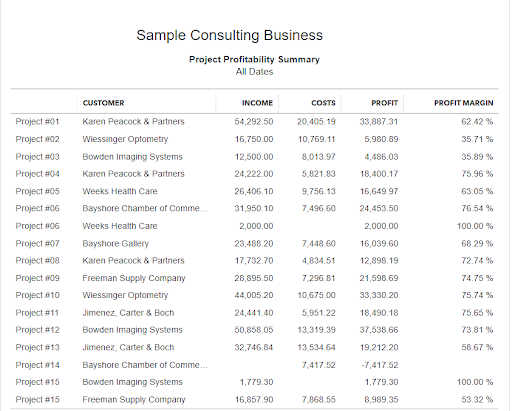
PROJECT PROFITABILITY REPORTS
QuickBooks automatically generates project profitability summary and detail reports, showing income, costs, gross profit, and margin. These reports help evaluate performance, identify cost overruns, and improve future pricing decisions.

LABOR COST TRACKING
Labor can often be one of your largest project costs. Both QBO Plus and Advanced support labor tracking. Labor costs by project are allocated from time sheet data. If you are using Intuit Payroll, the wage and employer tax costs come directly from the payroll module. If you are using an external payroll system, import timesheets from whatever time tracking system you use and set the cost rates from the project center. QBO Advanced provides enhanced features such as custom labor cost rates and deeper billable time analysis, making it ideal for labor-intensive businesses.

ESTIMATES AND INVOICING
Projects integrate seamlessly with estimates and invoices, allowing you to compare estimated versus actual results in real time. The Estimates to Actual report is in the QBO Advanced edition.
WHY USE PROJECTS?
Projects is ideal for construction companies, consultants, agencies, and any business managing work by job. It offers clearer insights than Classes or Tags and delivers built-in job profitability without additional systems.
The Projects module transforms QuickBooks Online into a powerful job profitability system, helping business owners make smarter, more informed decisions. If you’re already using QuickBooks but not leveraging Projects, you may be missing valuable insight that’s right at your fingertips. And if you’re not using QuickBooks yet, now is a great time to explore how the right system can bring clarity to your financials and support your growth. Visit our QuickBooks microsite to learn more, or contact Siegel Solutions—we’re happy to help you get started or optimize what you already have in place.