



24 Apr Run Projects? IES Is Your QuickBooks: Why Intuit Enterprise Suite is the Best QBO Solution for Project-Based Businesses
If You Run Projects, Read This
Hello friends,
This issue is for one specific audience: owners and finance leaders who run a project-based business. Construction, specialty trades, engineering, consulting, agencies, nonprofits running grant-funded programs — anyone whose profitability lives or dies at the project level.
If that’s you, and you’re still running QuickBooks Online Advanced or QuickBooks Desktop, here’s the bottom line: Intuit Enterprise Suite (IES) is the best QuickBooks solution on the market for project-based businesses. It’s a full project financial management platform built into the Intuit ecosystem — with several capabilities that do not exist in any other Intuit product.
Below is what’s new, what’s different, and why it matters. No fluff.
If your business runs on projects and needs stronger reporting, better cost visibility, and more control, contact us to learn more about IES.
— Jeff Siegel
The Problem This Solves
Most project-based businesses we work with use some combination of: QuickBooks for accounting, a project management tool (Monday, Procore, Knowify, a spreadsheet), a time-tracking tool, and an estimating tool. The data doesn’t talk. By the time anyone realizes a project is 15% over budget, it’s already 30% over budget. Month-end becomes archaeology. IES collapses that stack. Projects, estimates, change orders, budgets, time, payroll, bills, and reporting all live in one place — and the AI watches for problems while you’re focused elsewhere.

-
Project Phases
One of the biggest gaps in QuickBooks has always been the lack of a structured way to break projects into phases. In IES, you can now define phases directly inside the project — site prep, framing, MEP rough-in, finishes — and those same phases flow into your budgets, estimates, and reporting.
- Structure budgets and estimates by phase at both the project level and budget level.
- Track variances by phase so you can see exactly where you’re over or under — not just that you are.
- Roll up phase-level progress into project-level reporting without exporting to Excel.
This alone replaces what most of our project clients have been doing in spreadsheets for years.

-
Cost Groups
Cost Groups are a new concept in IES that sit alongside your existing product and service items. Think of them as industry-standard roll-up categories: Labor, Materials, Equipment, Subcontractor, and Miscellaneous.
- Designate cost groups on items in your products and services list.
- Track cost groups consistently across budgets, expenses, purchase orders, and bills.
- Report estimated vs. actual by category, not just line item — so you can answer questions like “why is labor 22% over budget on this job?” in seconds.
For anyone who has ever tried to fake this using QuickBooks classes or sub-items, this will feel like fresh air.

-
Project Budgets (Cost Budgets)
Project budgets got a meaningful upgrade in the Winter 2026 release. What used to be a planning artifact is now an operational tool.
- Simplified setup. Simplified setup with fewer steps to get a working budget in place.
- Phase-level tracking. Budgets track variances by phase, so you see over/under at the level that matches your project structure.
- Real-time insights. AI flags budget concerns as they develop, not at month-end. The Project Management Agent monitors in the background.
- Comprehensive reporting. Access critical metrics that aren’t available in QBO Advanced: cost to complete, work-in-progress, budget vs. actuals, and unallocated amounts.


-
Dedicated Project Manager Role
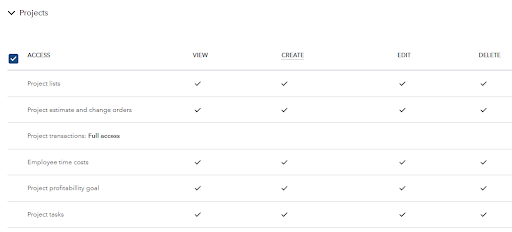
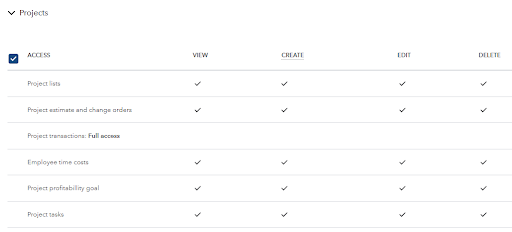
One of the quieter — but most valuable — additions in IES is a dedicated Project Manager role. This is not available in QuickBooks Online or QBO Advanced.
- Project managers get access to the project data they need — budgets, estimates, actuals, time, change orders — without seeing company-wide P&L, payroll, or sensitive financial data.
- You can assign projects by owner and monitor them by manager.
- Role-based permissions work across multiple entities, so if you have PMs working across related companies, you can grant access cleanly.
If you’ve ever hesitated to give a project manager access to QuickBooks because “they’d see everything,” this solves it.
-
Change Order Management
In QuickBooks Desktop, a change order meant editing the original estimate. In IES, change orders are separate transactions — which means you can track them, route them for client approval, and report on them independently.
- Create change orders as distinct transactions linked to the project.
- Route to the client for approval via a built-in workflow (including e-signatures in the construction edition).
- Handle negative change orders properly — another capability missing from prior Intuit products.
- Once approved, the change order integrates into the estimate for invoicing, but stays trackable as its own record.


-
Proposals & AIA-Style Invoicing
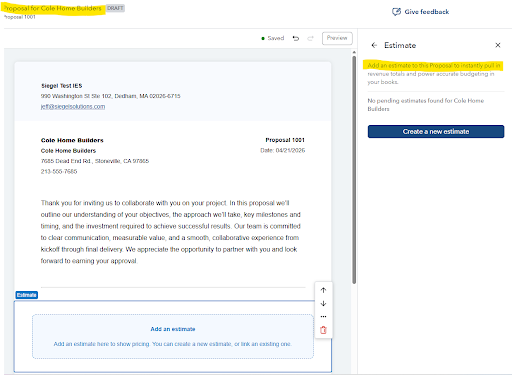
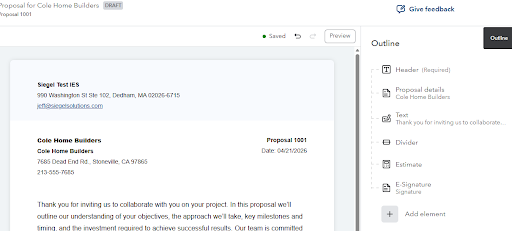
With the construction edition of IES, you can now generate proposals directly from estimates (or vice versa), build a customized proposal document, and send it for e-signature — all inside IES. AIA-style invoicing tracks total contract value, invoiced to date, current invoice amount, and remaining balance at the phase level.
This is a meaningful step toward replacing standalone proposal, e-signature, and progress-billing tools for project-based businesses.
-
The Project Management Agent
IES includes an AI-powered Project Management Agent that provides what Intuit calls “Project 360-degree insights.” In practical terms:
- Flags projects trending off-budget before month-end.
- Recommends specific actions to get projects back on track.
- Surfaces anomalies in labor cost, materials, or timing that a human reviewer might miss in the noise.
This is not chatbot AI. It’s an always-on layer that watches your projects and raises its hand when something looks wrong. A meaningful upgrade for any firm running more than a handful of concurrent jobs.
-
Project Reports You Actually Get
IES ships with a 15-report project package, including seven reports that were not available in QuickBooks Online. These are the reports project-based businesses have been asking for, for years:
- Committed Costs
- Change Orders
- Project Status
- Project Costs by Vendor and Project
- Project Costs Detail
- Unpaid Bills by Vendor and Project
- Time by Employee and Project
- Plus: Cost to Complete, Estimates vs. Actuals, Work-in-Progress, Budget vs. Actuals, Unallocated Amounts

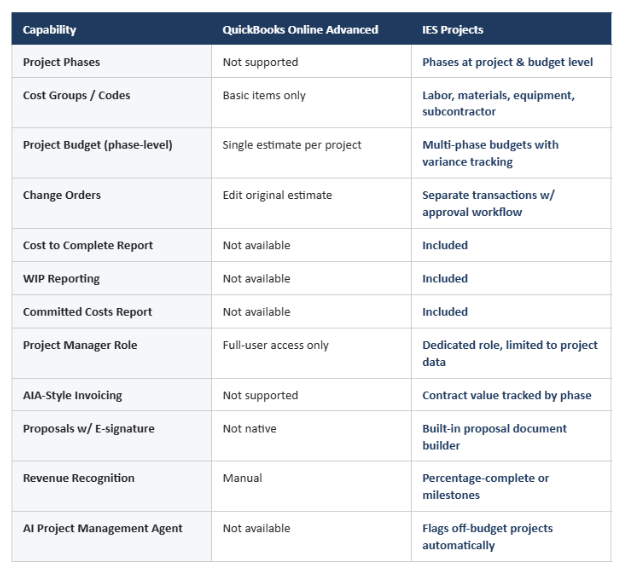
How IES Projects Compares to QBO Advanced
The short version:
Who Should Be Looking at IES Projects
This isn’t for everyone, and we’ll tell you honestly when it’s not the right fit. But if more than one or two of these describe your business, it’s worth a conversation:
- You run 5+ concurrent projects and your current setup can’t tell you which ones are profitable in real time.
- You’ve hit the ceiling on QBO Advanced’s project tracking — no cost to complete, no WIP, no change orders as separate transactions.
- Your project managers don’t have access to job financials because you don’t want them seeing company-wide numbers.
- You’re exporting to Excel every month to produce job cost reports.
- You’re paying for a separate project management tool, estimating tool, and proposal/e-signature tool that don’t talk to QuickBooks.
- You bill using progress billing, percentage-complete, or AIA-style schedules and currently handle it manually.
- You’re a contractor, specialty trade, engineering consultant, agency, or nonprofit with grant-funded programs.
How We Help
Siegel Solutions is an Intuit Premier Reseller for IES and a Top 100 QuickBooks ProAdvisor firm. We help project-based businesses evaluate whether IES is the right fit, migrate cleanly from QuickBooks Desktop or QBO Advanced, and build out the project, phase, cost group, and budget structures so the reporting you actually need starts working on day one. When IES isn’t the right answer, we tell you — and if you’ve genuinely outgrown IES, we also implement Acumatica as a Gold Partner.
Want to See It?
If your project reporting is a monthly headache — or if you’ve been wondering whether IES is worth the step up from QBO Advanced — let’s schedule a 30-minute call. We’ll look at your current setup and give you a straight answer.
If you are wondering whether IES is the right fit for your business, visit the Siegel Solutions contact page to schedule a conversation with our team.
Ride safe,
Owner & President, Siegel Solutions, Inc.
Intuit Premier Reseller | Top 100 ProAdvisor | Acumatica Gold Partner